
Latest News

If you use Marketing Cloud for mass communications and have ever wondered whether your email landed better with students than alumni, how your newsletters perform across time, or how your open rates compare across email announcements, the new Marketing Cloud Advanced Reporting Dashboard can help. It combines behavioral data from Marketing Cloud with affiliation records in Salesforce CRM and identifies engagement patterns that plain tracking reports alone don’t show.
Note that this tool is specific to Marketing Cloud and requires a Marketing Cloud account to access.
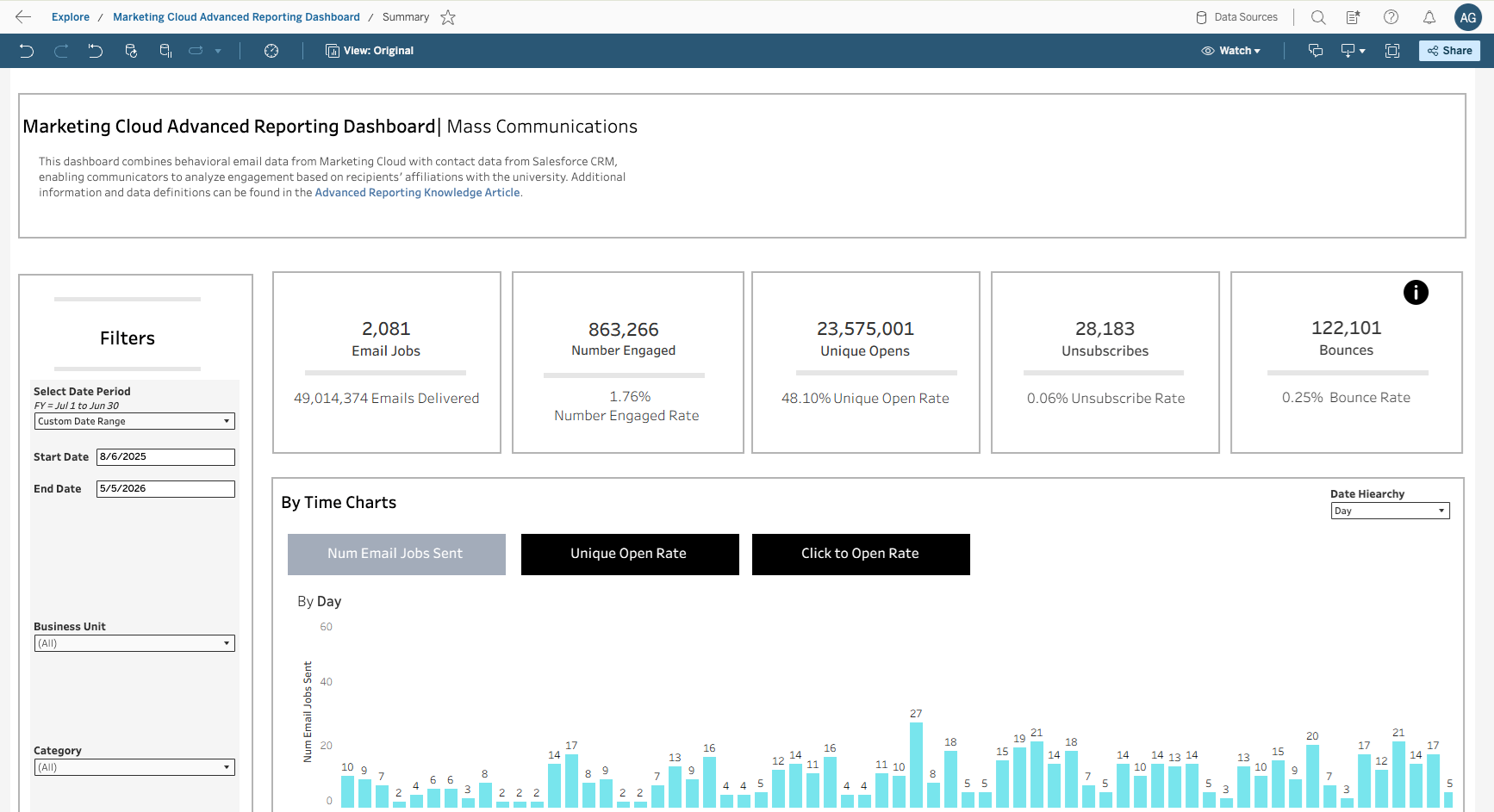
Key Metrics Display
The dashboard's header provides a quick snapshot of any campaign's performance across multiple core indicators:
- Emails Delivered and Total Email Jobs sent
- Engaged: Unique link clicks, excluding unsubscribes
- Opens: Unique recipients who opened at least once
- Unsubs: Recipients who opted out of future sends
- Bounces: Failed deliveries, including false bounces
In addition, the dashboard lets you review the number of email job, open rates, and ratio of clickthroughs to opens, for various time periods — by Day, Week, Month, Year, or Fiscal Year — so you can get a quick visual sense of the performance of your email campaigns.
Communicators should be aware that unique open counts can be inflated by Apple Mail Privacy Protection and email client inbox previews that pre-load tracking pixels and are impacted by image blocking and privacy features. Engagement (click) rate is usually a more reliable signal.
Filters for the dashboard let you choose specific send date, business unit (permissions mirror SFMC), affiliation, keywords, and more when choosing which metrics to display in the Dashboard panels.
Audience segmentation by affiliation
Another dashboard panel provides a breakdown of email performance broken down by the “affiliation” of the recipients.
You can view a by affiliation performance through two lenses:
- Primary affiliation (the recipient’s Cornell role)
Recipients are assigned to exactly one group following a strict hierarchy: Employee → Student → Alumni → Retiree → External → Sponsored. A person who is both an employee and an alumnus appears only under "Employee." - All affiliations
Every relationship a contact holds is counted. That same employee-alumnus would appear in both groups — useful for understanding cross-segment engagement, though aggregate totals will exceed the unique recipient count.
Note that the dashboard uses point-in-time affiliation data. A May 2023 mailing to a student still shows under "Student" even if that person has since graduated. Historical tracking began in August 2025, so earlier sends are not reflected.
Finally, the reporting dashboard gives a listing of email jobs sent out, which summarizes the performance of each email send and allows you to drill down to the performance of individual email sends.
Some Cautions About Analytics Discrepancies
Two quirks are worth knowing: First, because Marketing Cloud performs regular contact deletions for storage and privacy reasons, deleted contacts' events are anonymized but still roll up into aggregate metrics — meaning exported lists of unique openers may be smaller than the dashboard totals suggest. Second, "false bounces" — cases where a server initially reports a delivery failure but later confirms receipt — are included in the bounce figures on the dashboard even after they resolve, since the underlying data view retains that record.
How to access the dashboard?
Navigate to the dashboard using this link and use your NetID and password to get access:
Learn More
Additional information is available in a Marketing Cloud Advanced Reporting knowledge article on the Salesforce Success Hub.
To learn more about the Marketing Cloud rollout and details of the implementation plan for Cornell, visit Marketing Cloud FAQ.
Comments?
To share feedback about this page or request support, log in with your NetID