
Latest News
Beginning August 4, 2026, IT professionals will have access to a new Ask Big Red Technical Support Chatbot directly within the TeamDynamix application. This secured chatbot is designed specifically to answer IT professionals' support and troubleshooting questions, helping technical community members find information more quickly while working in TeamDynamix. The chatbot can also answer IT Service Management questions.
Open the Technical Support Chatbot in the Technician v2 Dashboard
The chatbot will be available from the CIT-Technician v2 dashboard; once opened, it remains in place regardless of the dashboard. For example, if your default TeamDynamix view is a custom dashboard, switch to the Technician v2 dashboard to activate the Technical Support Chatbot, then return to your preferred dashboard. The chatbot icon will remain available for the rest of your browser session.
Add the Ask Big Red Tech Chatbot to Your Custom TeamDynamix Dashboard
To add the Technical Support Chatbot to your dashboard:
- Create a +New Dashboard or select Edit Dashboard to change an existing one.
- Click + Add Widget
- Search for Create a Ticket.
- Click CIT Create a Ticket.
- Click Save.
Or, to add the Technical Support Chatbot without the CIT Ticketing block:
- Create a +New Dashboard or select Edit Dashboard to change an existing one.
- Click + Add Widget
- Search for TSP bot.
- Click IT@Cornell Ivy+ TSP Bot.
- Click Save.
For more information, see Create Custom TeamDynamix Dashboards.
Report Inaccurate Responses
If the chatbot provides an inaccurate answer, please submit a ticket directly from the chat interface to help improve future responses.
Visual Differences Distinguish the Chatbots
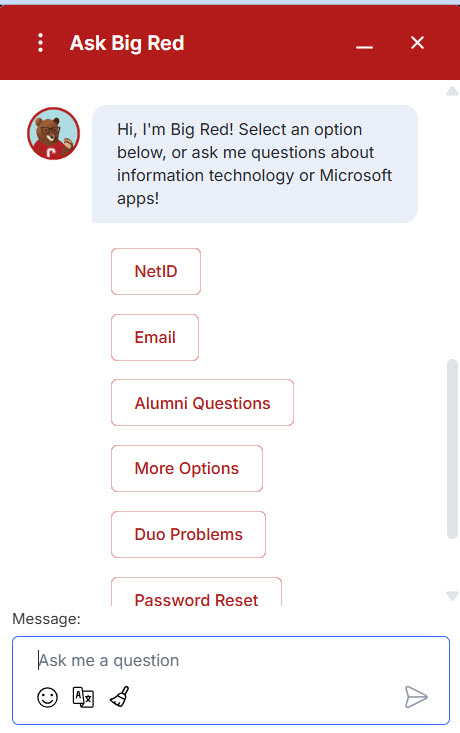
The public Ask Big Red chatbot for faculty, staff, and students will continue to be available on the IT@Cornell website.
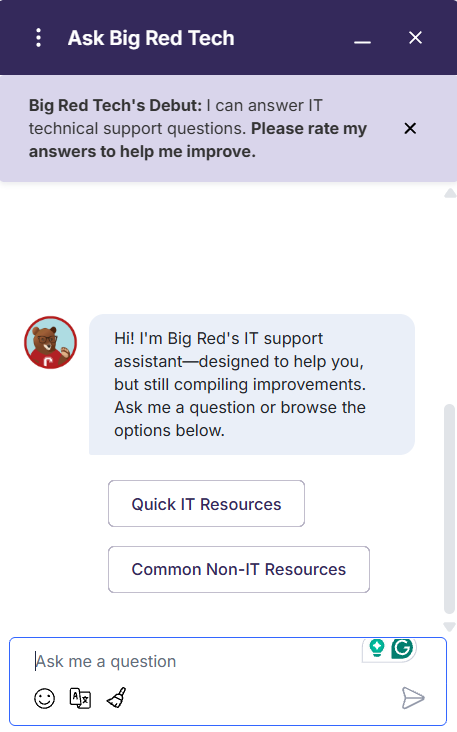
The TeamDynamix chatbot has a distinct appearance that matches the TeamDynamix application, making it easy to distinguish from the public version.
Tech Support Chatbot only available in TeamDynamix
Public Support Chatbot on the Information Technology website
Suggestions for improving the Technical Support Chatbot in TeamDynamix can be shared with the Communications & Documentation team using this request form.
Comments?
To share feedback about this page or request support, log in with your NetID