
Latest News

A new feature, Microsoft’s First Contact Safety Tip, has been enabled for Cornell email accounts through Microsoft Exchange. It is intended to raise awareness of potential phishing attempts for recipients in Outlook's desktop, browser, or mobile clients.
First Contact Safety Tip will insert a brief warning note at the top of a message, warning the recipient if the sender if this is the first time they have received a message from the sender, or if they don’t often get messages from the sender—for example, senders who have not sent the recipient a message for more than six months previous.
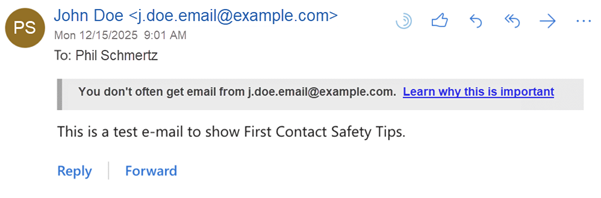
The inserted warning will include the text "You don’t often get email from [sender email address]" and include a link to Microsoft phishing awareness information. If the suspected message has been sent to multiple recipients, the warning will read, "Some people who received this message don’t often get email from [sender email address]."
If you see the warning text, there is no need to follow up or report these marked messages as phishing, since the email system is already aware. Simply delete the message if it is unwanted or unrecognized. Note that this feature cannot be turned off in individual users’ Outlook or Microsoft 365 settings.
First Contact Safety Tips are one of several recently introduced features intended to help protect all email recipients from suspicious email that might pose a phishing threat.
Comments?
To share feedback about this page or request support, log in with your NetID