
Latest News

Several new Microsoft Teams features will roll out over the coming weeks to help you reduce distractions, collaborate more easily, and improve the meeting experience. The new capabilities will appear automatically as Microsoft completes the rollout. You may notice the changes at different times depending on your Teams client and update schedule.
Pause Notifications
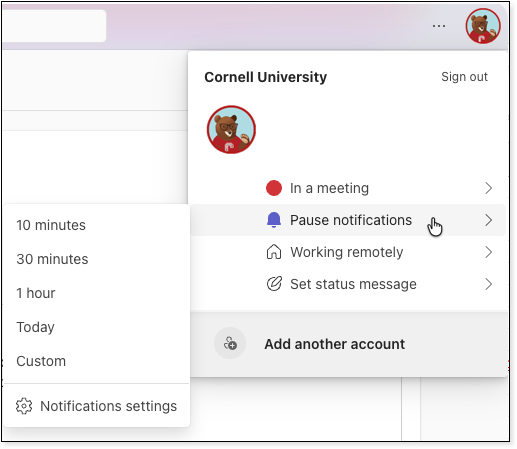
Teams will allow users to temporarily pause notifications for a selected period of time. Notifications will automatically resume when the selected time period ends. This feature will be available in Teams on desktop, web, and mobile devices. To access this feature, open the profile menu by clicking on your portrait in the upper-right corner of Teams. Select Pause notifications, and a time frame.
A Change-Up to Teams Meeting Controls
Microsoft is redesigning the Teams meeting experience to make common controls easier to find and reduce accidental clicks. Upcoming changes include:
- Meeting controls positioned in the center of the screen for easier access.
- Microphone, camera, and screen sharing controls grouped together.
- The Leave button separated from other controls to help prevent accidental exits.
- A reorganized "More" menu for less frequently used actions.
- The ability to customize meeting controls by pinning, unpinning, and rearranging buttons.
- An updated sharing experience that may include live previews and confirmation steps before sharing content.
These updates aim to make meetings feel less cluttered and give users greater confidence when sharing content.
Emoji Shortcuts on Mobile Devices
Teams users on iOS and Android will gain desktop-style emoji shortcuts. By typing a word between colons (for example, :smile:), users can quickly insert emojis while composing messages. Common emoticons such as :) and :D will also automatically convert to emojis.
Emoji Preferences Will Follow You Across Devices
Teams will also begin syncing recently used emojis and reactions across desktop, web, and mobile clients. Your "recently used" emoji list will remain consistent regardless of which device you use, creating a more seamless experience across Teams. Microsoft notes that this feature requires no action from users and has no impact on compliance, data storage, or privacy settings.
Stay Current with Teams
Join the Microsoft Teams Q&A Channel where you will stay current with updates, but also interact with others using Teams.
Comments?
To share feedback about this page or request support, log in with your NetID