
Latest News

On Tuesday, April 28, 2026, CIT will implement an updated, more secure version of Duo multi-factor authentication (MFA) for Microsoft applications. This change enhances security for Cornell accounts by upgrading the Duo MFA protection that’s already required for all Microsoft apps on the web and desktop, including, but not limited to:
- Outlook
- Excel
- PowerPoint
- Teams
- OneDrive
- OneNote
- Word
- Power BI
- Planner
- Bookings
- SharePoint
- Copilot
What’s Changing?
After April 28, you will be prompted to sign-in and authenticate with the new version of Duo the first time you open an app such as Outlook, Teams, or OneDrive.
The only change to expect is an additional screen during this initial sign-in process.
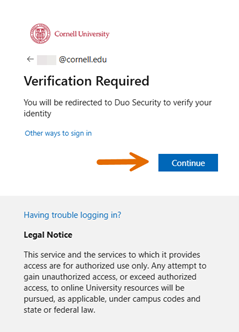
Click Continue and authenticate with Duo as you normally would.
After this initial authentication, you won’t be prompted to re-authenticate every single time you open an app, or when you use other Microsoft apps. For example, once you’ve completed the initial authentication in Outlook, you won’t be prompted to authenticate later when opening PowerPoint.
You can reduce future login prompts by checking a box to indicate that you want to stay signed in. This option should not be used on public or shared devices.
Comments?
To share feedback about this page or request support, log in with your NetID