
Copilot and Moderate Risk Data
In August 2026 the university approved Microsoft Copilot for use with some moderate risk data. Read below for details and how you protect Cornell data when using this AI tool.
Your Role in Data Security
All Cornell individuals are responsible for complying with university policies 4.12 (Data Stewardship and Custodianship), 5.10 (Information Security) and 4.21 (Research Data Retention). University Policy 4.5, Access to Student Information may also apply in certain circumstances.
Data Types
The university broadly classifies data by risk level. This page has more information about data risk, and the regulated data chart can help you identify what tools are safe for which kinds of data.
High Risk
No high risk, personal health information (PHI) or HIPPA data may be used with an AI tool.
Moderate Risk
This broad category covers most university data. If you are ever unsure about the safety of your unique dataset in an AI tool, contact a data steward or, in the absence of an applicable steward, your supervisor.
Copilot may not be used in peer review or IRB meetings. FERPA and international personal data require special consideration (see below).
Low Risk
Low risk data can be used with an AI tool. Broadly speaking, this includes public or openly-shared information, which carries the risk of negligible harm to individuals or the university.
Data in Copilot
Copilot is approved for moderate risk data, with special considerations for FERPA and international personal data.
FERPA
The Family Educational Rights and Privacy Act (FERPA) is a 1974 federal law protecting the privacy of student educational records. FERPA safeguards student privacy by limiting who may access student records, specifying for what purpose they may access those records, and detailing what rules they must follow when accessing the data.
International Personal Data
The laws regarding data about individuals located outside of the United States vary widely.
To use international personal data with Copilot, you must turn off web search first. Using a prompt that says (in essence) "don't search the web with this data" is not a reliable safeguard
Turn Off Web Search in Copilot
The greatest risk to Cornell data happens when Copilot uses the web to search for answers to your prompts. While there are measures in place to protect institutional data, they are not always completely effective. When using Copilot turn off web search to protect any sensitive Cornell data from public exposure.
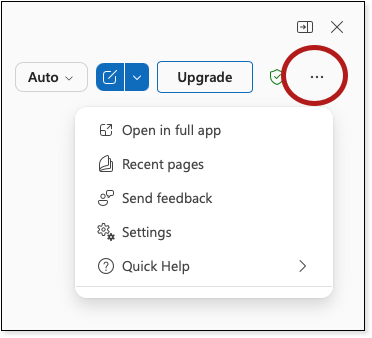
In Copilot, click the horizontal .
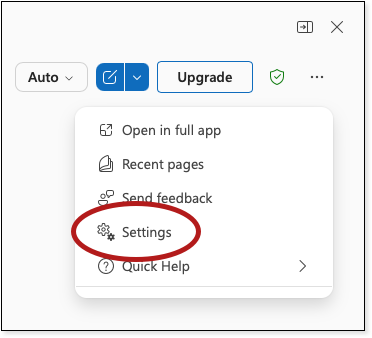
Select .
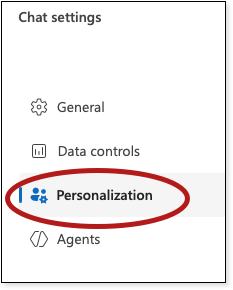
Select .
At the bottom of the list, select .
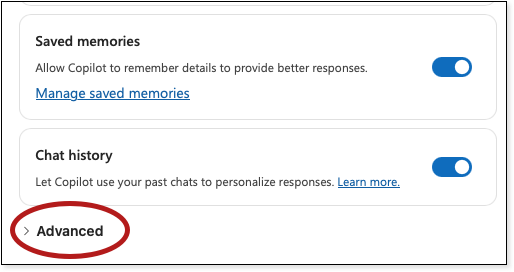
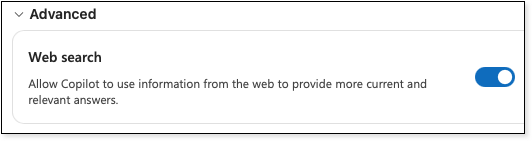
Toggle the Web Search button to the left. (This image shows web search is ON.)
Comments?
To share feedback about this page or request support, log in with your NetID