
Microsoft Azure—now Entra—Authentication Logins
Description of the authentication process for Microsoft services. Cornell services continue to use CUWebLogin.
This article applies to: Authentication
Microsoft Azure Active Directory is now called Microsoft Entra ID, but the instructions remain the same.
If You Have Never Logged in before (On This Device)
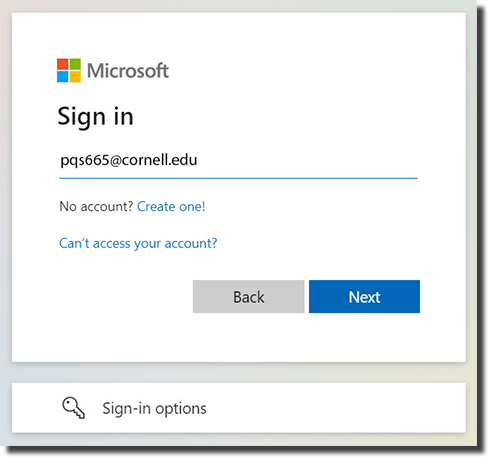
You will land on the Sign in screen, where you enter your netid@cornell.edu address, then select . On the following screen, enter the password associated with your NetID.
If You Have Logged in with One Account
You will land on the Enter password screen with your email address already displayed. Enter your password and click Sign in.
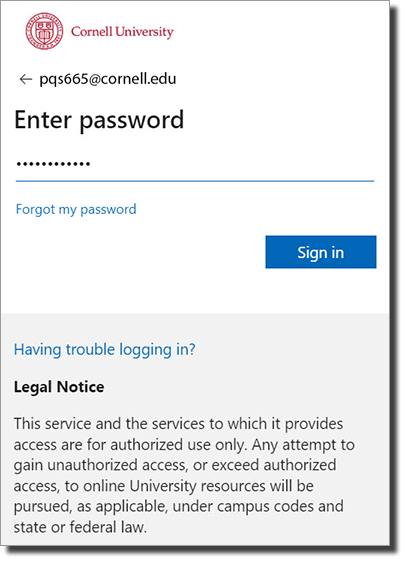
If you want to sign in to a different account, click the left-facing arrow near the top of the screen. This will take you to the Sign in screen where you can enter a different email address.
If You Have Logged in with Multiple Accounts
You will land on the Pick an account screen, which will show any account you've signed into on this device. Select the one you want to use. On the following screen, enter the password associated with that account.
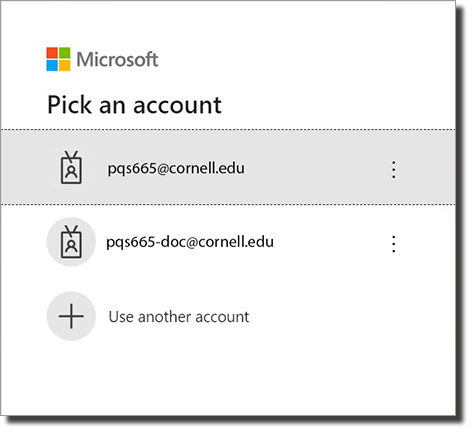
If you want to log in to a different account, click Use another account to be taken to the Sign in screen where you can enter a different email address.
If You Have Both a Personal and School Account That Use the Same Email Address
You will land on a screen displaying the two accounts. Pick Work or school account. On the following screen, enter the password associated with your NetID.
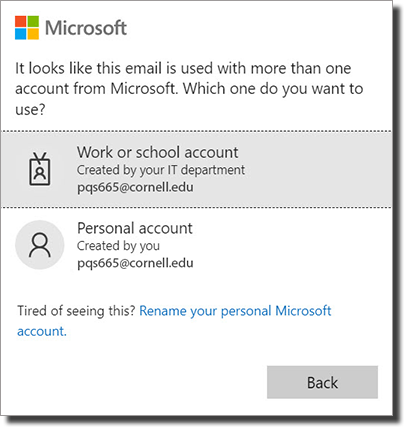
If you want to log in to a different account, click Back, which will take you to the Sign in screen where you can enter a different email address.
Comments?
To share feedback about this page or request support, log in with your NetID